OneGlass 8 (Color) - Icon Pack
EatosPersonalization
4.318.00 Reviews
- Version
- 1.5.1
- Installs
- 10.00K
- Age Rating
- Everyone
Screenshots
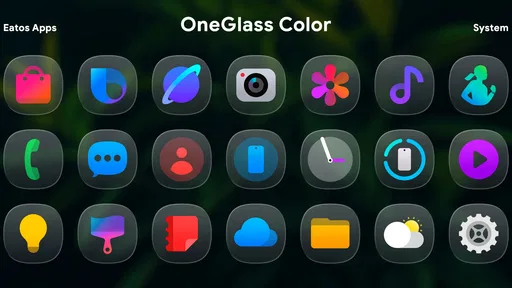
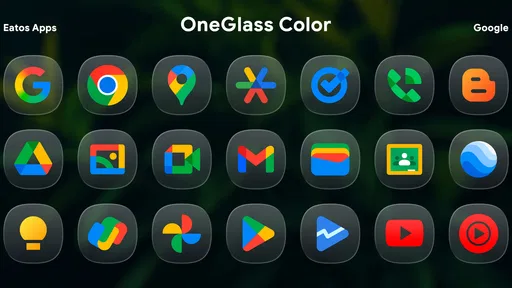
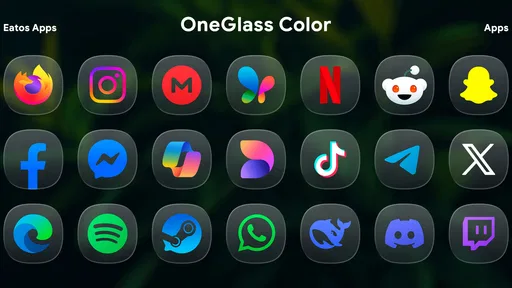
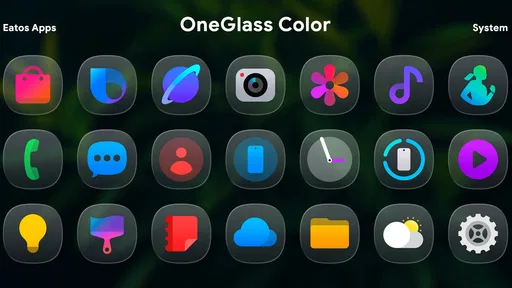
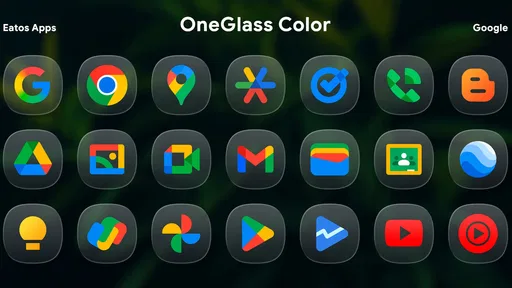
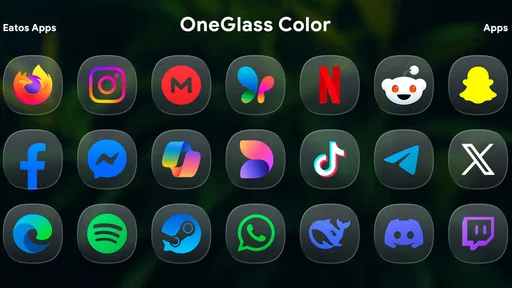
Our Review of OneGlass 8 (Color) - Icon Pack
 Analysis by Appyee
I like the idea behind a colorful icon pack most when it changes the feel of a phone without asking me to rebuild my entire home screen. That is the appeal of OneGlass 8 (Color) - Icon Pack: it focuses on the small visual details I see every time I unlock my device. It is a paid personalization app from Eatos, and the key question is whether a focused set of glass-style color icons is worth adding to your setup.
What the price means in practice
This is not a free download: it costs $1.49. I’d treat that as a modest one-time purchase for a particular look, rather than a subscription or a general-purpose customization suite. If you already know you enjoy colorful, translucent-looking icon designs, the price is easy to judge against how often you see your home screen. If you are unsure whether this style suits you, though, it makes sense to compare your launcher’s free themes and icon options before paying.
The app is rated for Everyone, and its current version is 1.5.1. It has an average rating of 4.3 from over 200 ratings, alongside more than 10,000 installs. Those figures suggest it has found an audience, but they do not tell me whether its icons will match your personal taste; the visual style matters more than popularity here.
Where the value comes from
An icon pack earns its place through consistency. A coordinated home screen can make a phone feel calmer and more intentional, especially if the default icons come from many different design styles. I see the strongest value here for someone who wants a colorful glass-inspired appearance and is willing to spend a little time applying icons and checking the result against their wallpaper.
There is a practical way to decide whether the look works: first choose a wallpaper you already use, then apply the pack and check the most-used apps on your first home-screen page. If the icons remain distinct against that background and the colors feel balanced in ordinary lighting, the change is doing useful work. If they blend into a bright or busy wallpaper, switching to a simpler background may be more effective than trying to redesign every screen around them.
First Impressions and Installation
Installing the OneGlass 8 (Color) - Icon Pack was as smooth as butter. It’s available on both Android and iOS, and if you’re like me, always on the lookout for something new and exciting, this app is worth a download. The installation process was straightforward, and within minutes, I was ready to dive into a world of color.
The app offers a slick interface that’s user-friendly. Even if you’re not the most tech-savvy person, navigating through the options is a breeze. The app developers have done an excellent job of keeping things simple yet functional.
Design and Aesthetics
Now, let’s talk about the real star of the show—the icons themselves. The OneGlass 8 Icon Pack features an eye-catching array of icons that are vibrant and modern. Each icon is meticulously designed, giving your phone a unique touch that stands out from the generic icons most devices come with.
What I love about these icons is their versatility. They’re colorful without being overwhelming, and they manage to strike a perfect balance between fun and professional. Whether you’re a student, a professional, or just someone who loves a splash of color, this icon pack offers something for everyone.
- Vibrant color palette
- Modern design
- High-resolution icons
Customization Options
One of my favorite aspects of this app is the level of customization it offers. You can mix and match icons to suit your style, and there are plenty of options to choose from. I spent a good hour just playing around with different combinations until I found the one that felt just right.
Moreover, the app integrates seamlessly with various launchers, making it easy to apply the icons without any hiccups. This flexibility is a huge plus for those who love to personalize their devices.
"Personalization is not just about aesthetics; it’s about making your device feel like an extension of yourself."
Performance and Usability
Now, you might be wondering, "Does this app slow down my phone?" Thankfully, the answer is no. I’ve been using it for a couple of weeks, and I haven’t noticed any lag or performance issues. The icons load quickly, and the app runs smoothly in the background.
Usability is another area where the app shines. The developers have clearly put a lot of thought into ensuring that the user experience is as seamless as possible. From easy navigation to quick loading times, everything about this app is designed to enhance your device without any hassle.
How it fits into everyday use
The benefit is easy to notice during ordinary routines. Picture checking a shopping list before heading out, opening a calendar to confirm an appointment, then returning to messages throughout the day. The icons are part of those tiny repeated interactions, so a coherent visual style can make the home screen feel more considered without changing how those apps work.
I would keep the first page practical rather than turning the whole phone into a design project. Put the apps you open most often where they are easy to reach, then use the pack on that page first. This is a useful test because it shows whether the color treatment helps you recognize familiar apps at a glance or makes the screen feel busier. You can leave less-used apps alone until you know you want a broader makeover.
That selective approach also helps if some icons do not suit the layout you already use. A personalized screen does not need every app to match perfectly; keeping a few original icons can be a sensible compromise when the pack’s visual treatment does not improve clarity for a particular shortcut.
What to check before buying
The main practical question is compatibility with your preferred setup. Icon packs generally depend on a launcher or customization method that can apply them, and the experience can differ between Android devices and home-screen systems. Before purchasing, check how your own launcher handles icon packs and whether you are comfortable applying icons there. A pack can look appealing in principle but deliver less value if your current setup makes customization awkward.
Another useful check is the mix of apps on your phone. If your everyday shortcuts are covered, the pack can create a more unified first screen. If several important apps keep their original appearance, the contrast may bother you. I would not assume that every icon you personally use will be included; plan for a mixed look and decide whether that is acceptable before making the purchase.
Think about your wallpaper and widgets, too. A colorful icon style may sit comfortably alongside a restrained background, while a highly detailed wallpaper and bright widgets can compete for attention. Trying a cleaner wallpaper first is a low-effort way to see whether the pack is the part you want to keep. This is a better test than changing several visual elements at once, because it lets you judge the icons on their own merits.
Compared with other personalization choices
Compared with a complete launcher makeover, an icon pack is a narrower change. It is a better fit if you like your existing layout and only want to alter the icons; it is less suitable if you want to reorganize the home screen or adjust a wider set of interface elements. A launcher with built-in themes may be more convenient for someone who wants a single place to manage multiple kinds of customization.
Compared with free icon alternatives, the choice comes down to style and willingness to pay. Free options are sensible if you are browsing casually or are not yet sure what look you want. This pack makes more sense when its particular colorful glass aesthetic is the reason you are customizing, rather than simply wanting any change at all. I would pay for a defined look I expect to keep, not just to collect another option I may never apply.
There is also a trade-off between visual consistency and instant recognition. Familiar default icons can be easier to identify because you have seen them for years. A new treatment may make the home screen feel fresh, but it can take a little adjustment if colors and shapes differ from what you expect. I would apply the pack to the apps I use daily, live with the result for a while, and only then decide whether to extend the style across the rest of the screen.
Who is likely to enjoy it
I think this is best for Android users who already enjoy customizing their home screen, prefer color over a strictly monochrome look, and want an icon-focused change rather than a full interface overhaul. It also suits someone who likes to experiment with different combinations and is happy to make a few small layout decisions to get a polished result.
I would skip it if you never notice your icons, strongly prefer the phone’s original appearance, or expect a pack to transform the whole interface on its own. It is also a poor match if you do not want to deal with launcher compatibility or if you need every app shortcut to have a perfectly consistent appearance. In those cases, sticking with defaults or choosing a broader theme built into your device may be easier.
Design and Aesthetics
Now, let’s talk about the real star of the show—the icons themselves. The OneGlass 8 Icon Pack features an eye-catching array of icons that are vibrant and modern. Each icon is meticulously designed, giving your phone a unique touch that stands out from the generic icons most devices come with.
What I love about these icons is their versatility. They’re colorful without being overwhelming, and they manage to strike a perfect balance between fun and professional. Whether you’re a student, a professional, or just someone who loves a splash of color, this icon pack offers something for everyone.
- Vibrant color palette
- Modern design
- High-resolution icons
Customization Options
One of my favorite aspects of this app is the level of customization it offers. You can mix and match icons to suit your style, and there are plenty of options to choose from. I spent a good hour just playing around with different combinations until I found the one that felt just right.
Moreover, the app integrates seamlessly with various launchers, making it easy to apply the icons without any hiccups. This flexibility is a huge plus for those who love to personalize their devices.
"Personalization is not just about aesthetics; it’s about making your device feel like an extension of yourself."
Performance and Usability
Now, you might be wondering, "Does this app slow down my phone?" Thankfully, the answer is no. I’ve been using it for a couple of weeks, and I haven’t noticed any lag or performance issues. The icons load quickly, and the app runs smoothly in the background.
Usability is another area where the app shines. The developers have clearly put a lot of thought into ensuring that the user experience is as seamless as possible. From easy navigation to quick loading times, everything about this app is designed to enhance your device without any hassle.
Community and Support
The OneGlass 8 community is active and engaging, which is always a good sign. I found several forums where users share their setups and offer tips on how to get the most out of the app. Plus, if you ever encounter any issues, the support team is readily available to assist, which is a huge relief for someone who values customer service.
In addition, the app receives regular updates, ensuring that new icons and features are continually added. It’s clear that the developers are committed to keeping the app fresh and exciting.
Cost, trade-offs, and my verdict
For me, the purchase makes sense when I am choosing this exact visual style, not when I am simply looking for a free way to change my phone. At $1.49, it is a small, direct expense, but the value still depends on practical fit: whether the pack works with my launcher, covers the shortcuts I care about, and looks clear with my wallpaper. Those are the checks I would make before deciding that the price is worthwhile.
The trade-off is that an icon pack changes appearance, not the underlying apps or the way the phone works. It cannot replace a launcher if what I want is a different layout, and it may leave a mixed appearance if some shortcuts do not use its artwork. I see that as a reasonable limit for a focused personalization app, but it matters if you expect a complete redesign from one purchase.
OneGlass 8 has an Everyone age rating, which makes its intended audience broad, but the style itself is more specific: people who like vivid, modern icons are the ones most likely to appreciate it. The app’s 4.3 average from over 200 ratings gives a useful sign of how other users respond, while the more than 10,000 installs show that it has reached a real audience. Neither figure can tell you whether you will prefer its look to your current setup.
Final Thoughts
To wrap things up, if you’re looking to breathe new life into your device, the OneGlass 8 (Color) - Icon Pack might just be your new best friend. It offers a dazzling array of icons that are not only stunning but also highly functional. With its user-friendly interface, excellent performance, and fantastic customization options, this app is a must-try for anyone looking to spruce up their phone.
So, why not give it a shot? You might just find that a little color goes a long way in making your everyday interactions with your device a whole lot more enjoyable.
Verdict
Strengths of OneGlass 8 (Color) - Icon Pack
- Vibrant and unique color palette.
- Regular updates with new icons.
- Compatible with most launchers.
- High-resolution icons look sharp.
- Easy to apply and customize.
Limitations of OneGlass 8 (Color) - Icon Pack
- Limited free icons available.
- Requires launcher for full functionality.
- Some apps lack icon customization.
- Occasional mismatched icon themes.
- Requires in-app purchases.
Other Releases by Eatos
View All
OnePro (Dark) - Icon Pack
Personalization4.8

OneGlass 8 - Icon Pack
Personalization4.8
Similar Picks in This Category
View All
Microsoft SwiftKey AI Keyboard
SwiftKey4.3

Wallpapers
Google LLC4.1

Zedge™ Wallpapers & Ringtones
Zedge4.7

Yandex Browser with Alice AI
Direct Cursus Computer Systems Trading LLC4.3

Ringtone Maker:create ringtone
Big Bang Inc.4.7

Fonts Keyboard
Fonts Keyboard3.9
Frequently Asked Questions
What is OneGlass 8 (Color) - Icon Pack?
OneGlass 8 (Color) - Icon Pack is a personalized icon pack designed to enhance the aesthetic of your Android device. It features a colorful, glassy theme that refreshes the look of your home screen with over 1000 unique icons. The pack is compatible with most popular launchers, allowing users to easily customize their device’s interface.
How do I install OneGlass 8 (Color) - Icon Pack on my device?
To install OneGlass 8 (Color) - Icon Pack, first ensure you have a compatible launcher installed on your device. Download the icon pack from the Google Play Store, then open your launcher settings. Navigate to the icon pack option, select OneGlass 8, and apply it to see the new icons on your home screen.
Is OneGlass 8 (Color) - Icon Pack compatible with my device?
OneGlass 8 (Color) - Icon Pack is designed for Android devices and is compatible with a wide range of popular launchers, including Nova Launcher, Apex Launcher, and ADW Launcher. However, it may not work on certain default launchers, so it's important to verify compatibility with your specific launcher before downloading.
Does OneGlass 8 (Color) - Icon Pack offer regular updates?
Yes, OneGlass 8 (Color) - Icon Pack provides regular updates to ensure users have access to new icons and improvements. The developers frequently add new icons based on user feedback and update existing ones to keep up with app redesigns, ensuring a consistent and modern look for your device.
Are there any in-app purchases or ads in OneGlass 8 (Color) - Icon Pack?
OneGlass 8 (Color) - Icon Pack is a paid application, meaning there are no in-app purchases or ads. Once purchased, you gain access to the entire collection of icons without any additional charges. This ensures an ad-free and seamless user experience while customizing your device.
